How to Change Your Apple ID on iPhone and Apple Devices | True

![[BetterLiv] - /betterliv/support/how-to-change-apple-id banner](https://images.contentstack.io/v3/assets/blt8ba403bee4433fd8/blt29e791cf34c92fb5/6926ac01c5f92033317ca00d/Banner-apple-id.webp?auto=webp)
How to Change Your Apple ID Password on iPhone
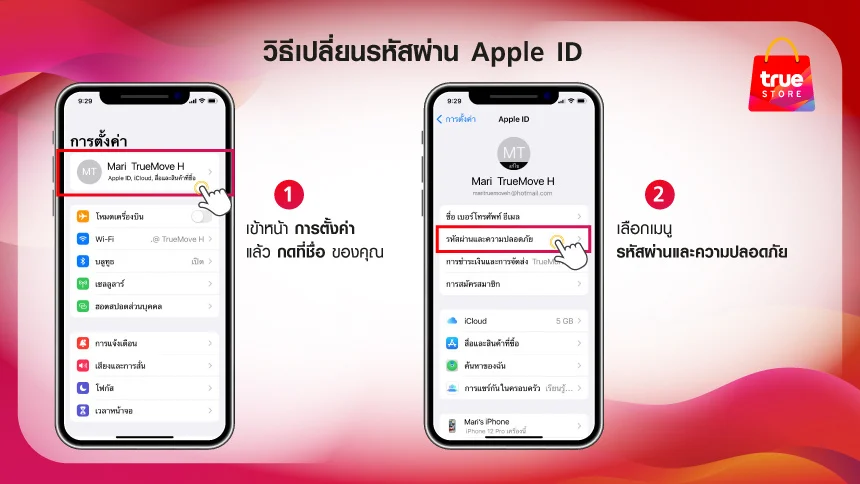
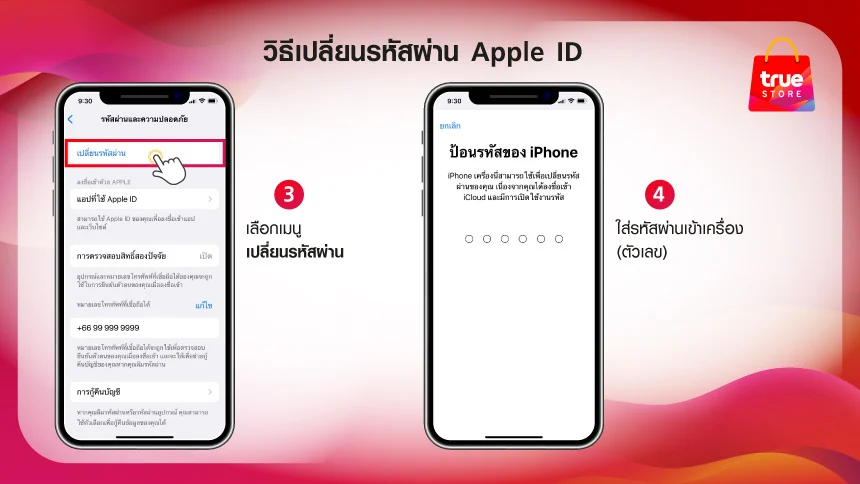
You can easily change your Apple ID password by following these steps:
- Go to Settings > tap your name.
- Tap Password & Security.
- Tap Change Password.
- Enter your iPhone passcode (number)
- Enter your new Apple ID password in both fields and tap Change.
- Choose whether to Sign Out of Other Devices.
For more information about data transfer, click here