Mobile Network Problems? How to Fix Signal Issues | True

![[BetterLiv] - /betterliv/support/how-to-solve-mobile-network](https://images.contentstack.io/v3/assets/blt8ba403bee4433fd8/blt2623d823c1f85289/6926b3225a706dd404f79494/banner-how-to-solve-mobile-network-desktop.webp?auto=webp)
How to fix a slow mobile internet connection (iPhone & Android)
How to fix slow mobile internet issues on iPhone and Android devices.
You can do it yourself easily — just follow the steps below.
Do you know sometimes when you use your smartphone for a long time, you may find that using internet or social applications (e.g. Facebook, YouTube or TikTok) takes a long time to load pictures or videos — wasting time waiting.
Here are 3 easy troubleshooting steps you can do by yourself:
1. Turn on Airplane Mode
Enable Airplane Mode for about 2–3 seconds. This temporarily turns off all wireless connections — then turn it off to let your phone reconnect to the network. This is the most basic method to try when your internet starts slowing down.
How to turn on Airplane Mode on an iPhone
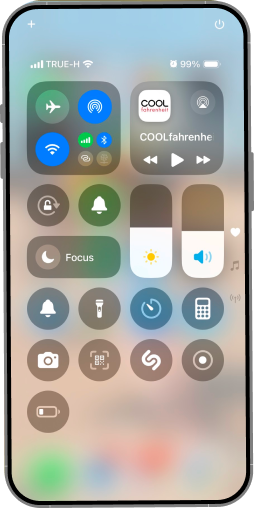
Look for the airplane icon. To enable it, tap the icon as shown. Tap again to turn it off.
2. Restart your phone
Sometimes, slow internet or poor signal can be due to your device acting sluggish. Restarting often helps.
How to restart an iPhone
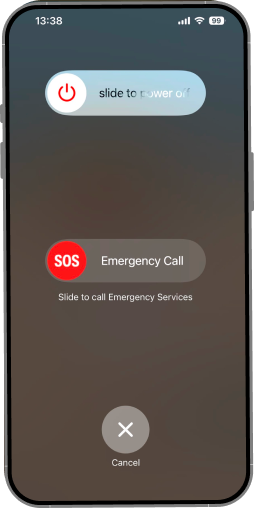
Press and hold the side button together with the volume-up button until the shutdown menu appears. Slide to turn off the device. Wait about 10 seconds, then press the side button again to turn it back on.
3. Check the Internet in Your Package
Open the True app on your smartphone.
If you don’t have the app yet, download it from:
Log in using your TrueMoveH phone number.
In case your internet quota has run out:
If your internet quota has run out, tap “Get add-on” on the home screen.
If you want to change your main package, go to “Details” → “Change Main Package.”
How to purchase add-on package on true app in case your internet quota has run out
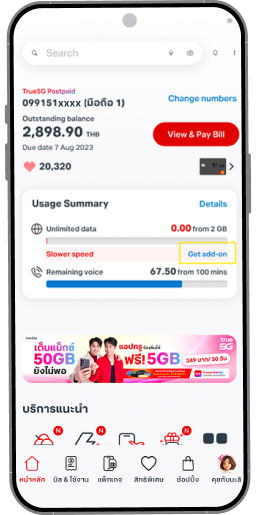
Tap “Get add-on” on the home screen.
Finally, after using your smartphone for a while, it is recommended to restart the device regularly — at least once a week. This helps your phone return to optimal performance and run fast again, just like new.